All-in-One Construction Project Control
Connect your team, documents, and budgets in one place — with new project files in your own Dropbox or Google Drive — and keep every project on track, from planning to delivery.
- 14-day free trial
- No credit card for the trial
- Unlimited team members
Per team member: members are unlimited on every plan
Plans, every core module in each
Days of free trial, no card required
Storage choices: your own Dropbox or Google Drive
Platform Features
Everything You Need to Manage Projects
From planning to closeout, Vera Croft keeps every record of a project in one place — and new project files in your own Dropbox or Google Drive.
Project Dashboard
Progress, open items, live activity and today's tasks for one project.
Project Phases
Phases and subtasks on a timeline, with a schedule health verdict.
Task Management
Kanban boards for tasks and phase subtasks, with priorities and deadlines.
Daily Logs
Site logs with weather, workers, photos and voice notes.
Quality Control
RFIs, submittals and punch lists, plus specification and drawing registers.
Document Control
Documents with version history, in your own Dropbox or Google Drive.
Media
Site photos and videos in albums, searchable by location and date.
Budget Tracking
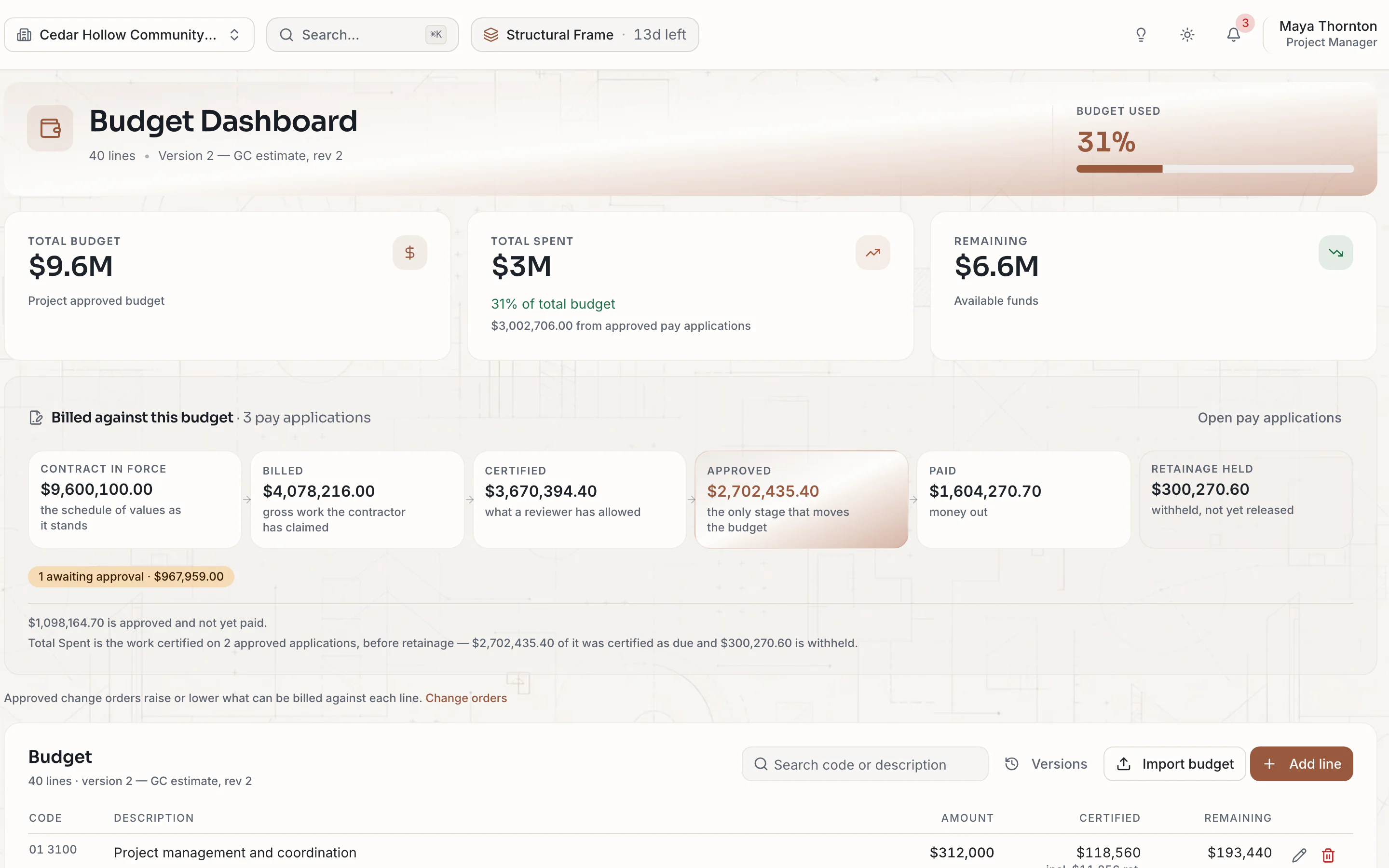
Budget versions, estimate import, and a forecast against the original budget.
Change Orders & Pay Applications
Change orders, and AIA G702/G703 pay applications certified and approved in the app.
Site Access & Security
Site access codes, and a record of security devices and incidents.
Team Directory
The whole project team with roles and contacts.
Messages
Direct messages between project members, with file attachments.

Why Vera Croft
One Record for the Whole Job
Vera Croft is designed to help construction teams of all sizes keep schedule, budget and paperwork in one place.
Save Time & Money
Keep logs, RFIs, budgets and files in one place instead of across inboxes and spreadsheets.
Office and Field in Sync
Messages, notifications, the activity feed, RFIs, punch lists, daily logs, documents and media update live, in the browser on any device.
Easy to Use
Invite your team, connect your Dropbox or Google Drive, and start on your first project.
Flexible & Scalable
Plans are priced by active projects with unlimited team members, and you add projects one at a time as you grow.
Privacy & Security
New project files go to your own Dropbox or Google Drive
Vera Croft writes new project files into your own Dropbox or Google Drive — the account the project's storage owner connects — so they stay in an account you control. Some older files remain in Supabase Storage and file contents can pass through our servers; the Privacy Policy explains both.
Stored in your own account
Connect your own Dropbox or Google Drive for new project files, in a VeraCroft folder named for the project. The Privacy Policy explains legacy storage and processing through our servers.
Private by design
Your connected account holds new project files. We keep metadata and perform authorized file operations; some older files remain in Supabase Storage, as the Privacy Policy explains.
You hold the keys
Grant or revoke access at any time straight from Dropbox or Google Drive. Disconnect, and the files already in your account stay there.
No vendor lock-in
Because new project files sit in your own Dropbox or Google Drive, you keep full ownership and access even outside the platform. Cancelling Vera Croft deletes nothing there.
Move files between providers
Move a project from Dropbox to Google Drive, or the other way around. Vera Croft copies accessible files and changes their references when the migration completes; unresolved files need your review.

New project files go to the Dropbox or Google Drive account connected to the project.
Platform Preview
See Vera Croft in Action
The same project dashboard on a desktop, a tablet and a phone — Vera Croft is a web application that adapts to the screen, and on iPhone it is also an app on the App Store.
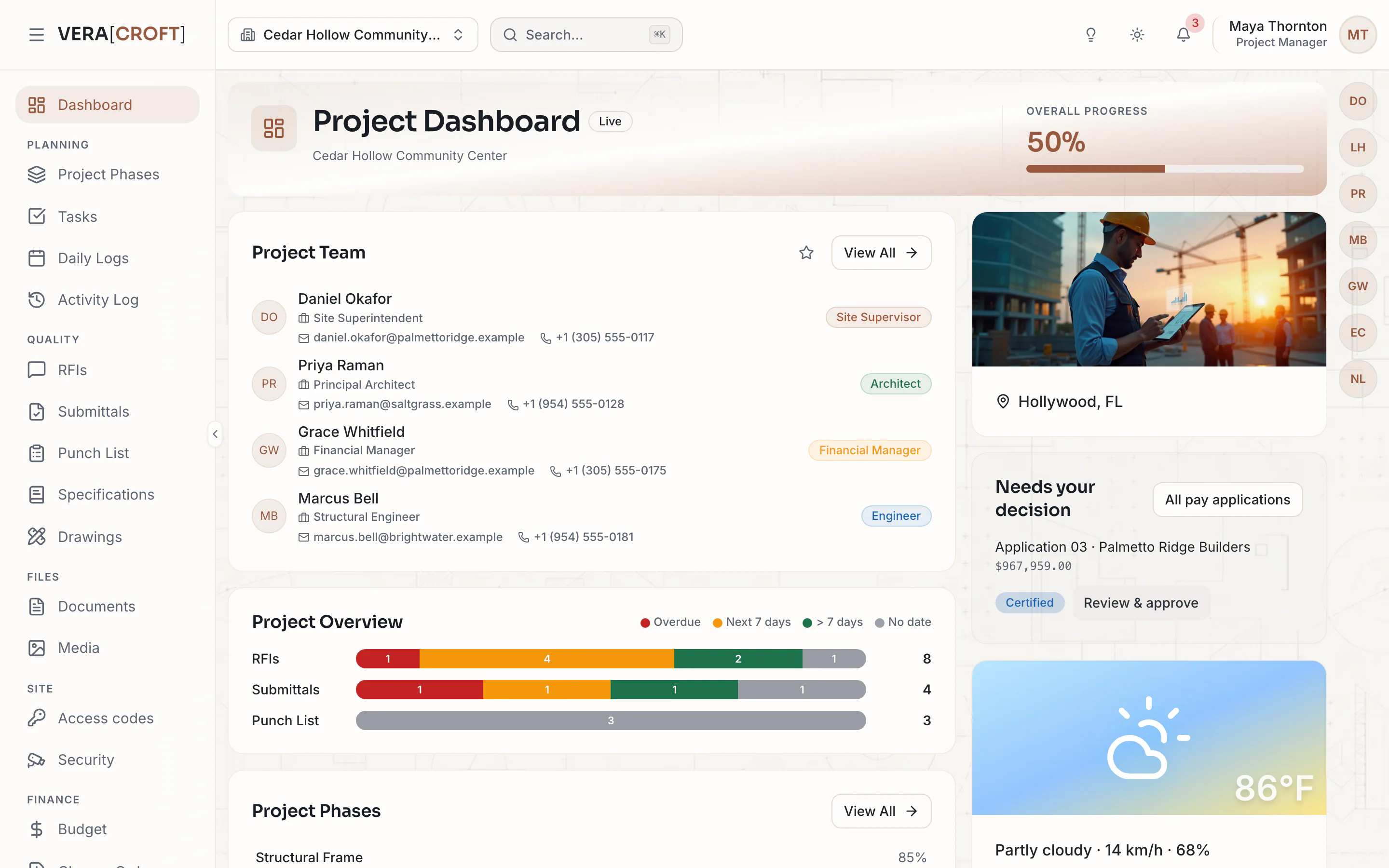
- Progress averaged across phases
- Open RFIs and submittals by due date, plus punch items
- Live activity feed
- Today's tasks, edited in place
From our team
How the Vera Group Team Runs Projects on Vera Croft
These are people on the Vera Group team who run their own projects on Vera Croft, in their own words.
Everyone quoted here is an employee or internal user of VERA GRP LLC, which operates Vera Croft. None of them is an independent third party.
"Before Vera Croft we were juggling spreadsheets, email threads, and three separate apps. Now every project, budget, and document lives in one place. Our weekly reporting takes half the time and nothing slips through the cracks anymore."
Nikolay Polushkin
Real Estate Developer, VERA GRP LLC
VERA GRP LLC team
"The real-time collaboration changed how we run jobs. My field crews upload photos and daily logs straight from their phones, and I see it instantly at the office. We catch issues the same day instead of finding out a week later."
Elvis Rodriguez
Project Manager, Rodriguez Construction Group
VERA GRP LLC team
"Budget tracking alone made it worth it. We can spot a potential overrun before it happens and keep clients updated with numbers we actually trust. It's the most organized our operation has ever been."
Raul Payrol
Operations Manager, QC Constructions
VERA GRP LLC team
"Vera Croft is intuitive enough that my whole team was up and running in a day. RFIs, submittals, and punch lists used to be a paperwork headache — now they're streamlined and trackable. I can't imagine going back."
Winston Benjamin Vidiella
Principal, Contempo Construction Group, LLC
VERA GRP LLC team
Ready to Simplify Your Construction Projects?
Run your projects on Vera Croft. A new business gets a 14-day free trial with no credit card, then picks the plan that fits the number of projects it has on the go.
- No credit card for the trial
- Unlimited team members
- New project files in your own Dropbox or Google Drive